Three steps
Start without connecting anything and connect your account only when you want to run a strategy.
1. Explore
Discover the library bots and get to know the AI Bot Creator and the manual builder.
2. Connect
Link your broker or exchange account from a supported provider, with controlled permissions.
3. Automate
Configure, activate and follow your strategy, in DEMO or REAL when available and authorised.
Explore: three ways to create
Connect your account
Your funds always stay at your broker or exchange.
- Brokers: you authorise on the broker’s own page (OAuth); we never see your password.
- Exchanges: an API key you create, with trading permission only, no withdrawals.
- You can disconnect the account whenever you want and revoke access at the source.
Supported platforms
 IQ Option
 Exnova
 IQ Broker
- BINANCE
and more, coming soon. See each provider’s status
Automate, always in control
The strategy only runs while it is active and authorised by you.
You decide
Start, pause or stop whenever you want.
Protection
Set risk limits before activating.
Follow it
See orders, results and status in the app.
In the cloud, 24/7
Bots run on TradingNext infrastructure: you do not need to keep your computer on.
DEMO and REAL are separate environments and availability depends on the provider and the account. Nothing you click on this site opens real accounts, starts bots or sends orders: all of that needs your confirmation in the app.
See It in Action
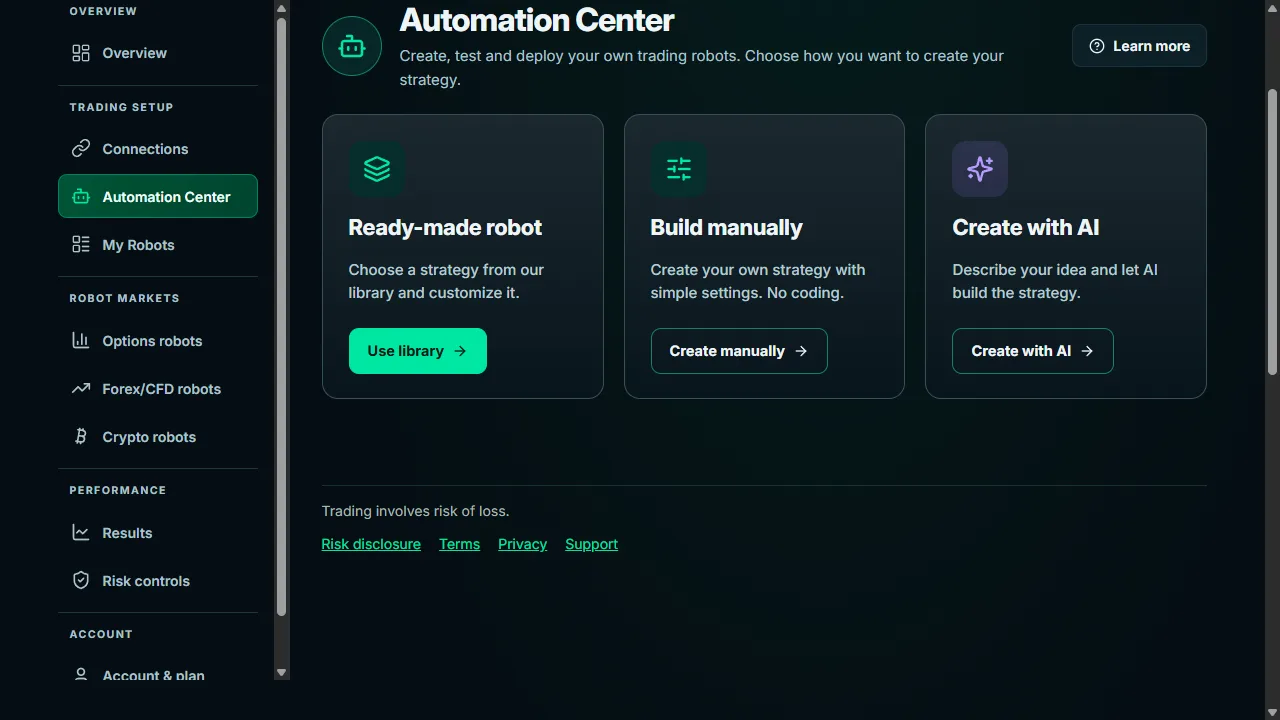
The app’s Automation Center brings the three ways to create together in one place.
Ready to get started?
Explore the bots, create with AI or connect your account.